


One Medical
3.1975.00 Reviews
App Specs
- Version
- 4.126.0
- Updated On
- License
- Free
- Downloads
- 500,000+
- Developer
- 1Life Healthcare, Inc.
- Categories
- Medical
- Platform
- Android
Screenshots
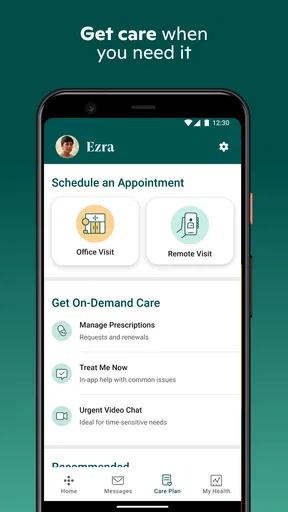
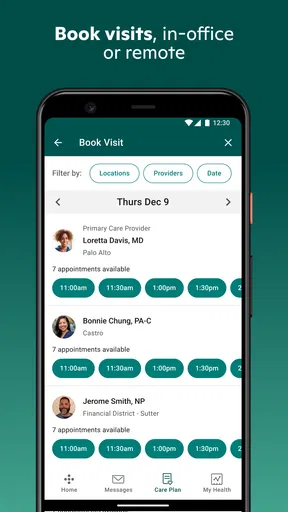
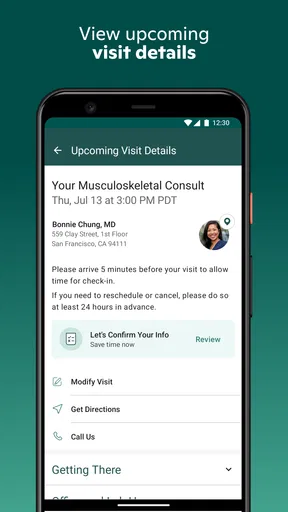
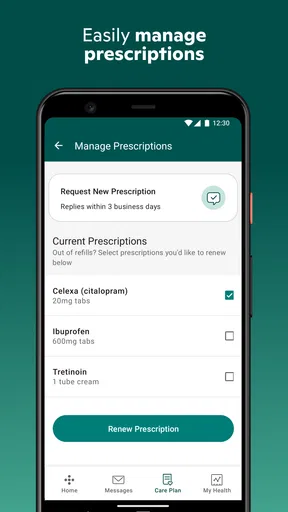
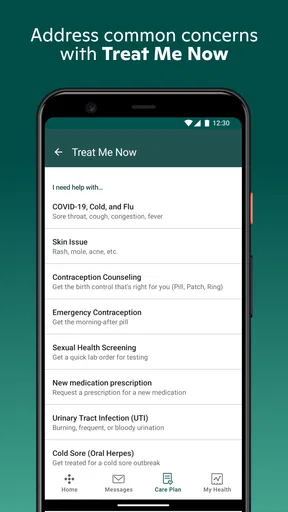
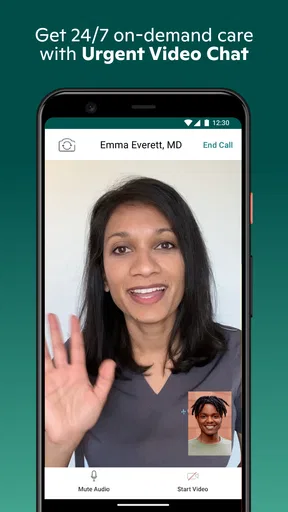
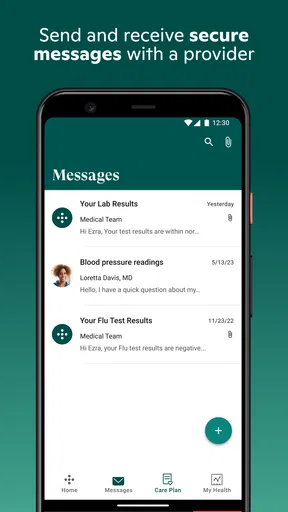
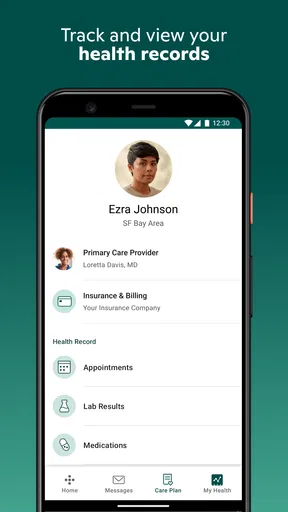
 Analysis by AppCompare
When I want a simpler way to arrange routine medical care, I look for more than a polished appointment screen. I want to know whether the app helps me choose the right kind of care, keeps the practical details together, and saves me from unnecessary back-and-forth. That is the standard I applied to One Medical, a free medical app from 1Life Healthcare, Inc.
My overall impression is that it is most useful as a digital front door to care rather than a complete replacement for every healthcare service. It is designed to make care for the body and mind easier to reach, which makes it appealing for everyday concerns, ongoing support, and people who prefer handling arrangements from a phone. At the same time, the experience is not automatically ideal for every patient or every medical situation.
The app has been available since March 27, 2013, and its current version is 4.126.0. It is rated for Everyone and requires at least OS 10, so the technical entry point is relatively broad for people using supported phones. Its average rating is 3.0 from around 2.2 thousand ratings, while more than 500 thousand people have installed it. Those figures suggest a substantial user base, but also a mixed experience worth considering before making it part of your healthcare routine.
How I Decide Whether One Medical Is the Right Fit
I would begin with the kind of care I usually need. If my main goal is to find a regular way to manage appointments, communicate about ordinary health concerns, or keep mental and physical care in the same general workflow, this app is easier to justify. It is less convincing if I only need emergency guidance, highly specialized treatment, or a standalone symptom checker.
The first decision criterion is convenience with a purpose. A medical app should not merely move paperwork onto a phone. It should reduce the number of steps between realizing that I need help and knowing what to do next. In my experience, the value of One Medical comes from putting that process in one place instead of making me begin with a search engine, call several offices, and manually track every response.
The second criterion is whether I am comfortable using a digital channel for the early part of a healthcare interaction. Some people want to explain everything face to face from the beginning. Others prefer composing a message carefully, checking available options, and dealing with routine details when they have time. One Medical makes more sense for the second group, especially when the issue does not appear to require immediate physical attention.
I also consider how often I expect to use it. Installing a healthcare app for one isolated question may not produce much benefit. The stronger case is for someone who expects recurring appointments, follow-up conversations, or a continuing relationship with a care provider. The more often I need to organize care, the more valuable a single mobile starting point becomes.
Worth Reading Before You Choose

EA SPORTS FC Mobile 26 Is a Bigger Football Game, but It Takes Time

Flipboard Shows What News Apps Must Do Beyond the Feed

Switching to Android Auto Means Rethinking Your Driving Routine

Google Calendar Makes a Crowded Week Easier to Manage

Ludo King Makes the Most of the Minutes Between Plans

Baby Panda World Brings Quick Play to Modern Phones, but Its Game Library Feels Busy
There is an important safety boundary here. I would not treat the app as a substitute for emergency services or urgent in-person assessment. A phone interface can help initiate care, but it cannot remove the need for immediate professional attention when symptoms are severe, rapidly changing, or potentially dangerous. That is not a flaw unique to this app; it is a basic limitation of digital healthcare.
What I Check Before Relying on It
Before depending on any medical app, I would make sure my phone meets the minimum OS requirement and that I can access the account details needed for care. I would also think about privacy in practical terms: notifications may appear on a lock screen, and a shared phone can expose sensitive information. Turning off visible message previews or using a device passcode is a small step that matters more for a medical app than for an ordinary shopping tool.
I would keep my expectations realistic about response time. A digital request is convenient, but it does not mean every concern receives an instant answer. If I need a decision quickly, I would use the appropriate direct healthcare channel rather than waiting inside an app. The best workflow is to use One Medical for organization and access while keeping a separate plan for urgent needs.
Another useful preparation step is writing down the essentials before starting: symptoms, when they began, current medicines, relevant conditions, and the question I actually want answered. This is one of the less obvious advantages of a mobile healthcare workflow. Because I can prepare before sending anything, I am less likely to forget a detail than I might during a rushed phone call.
Where the App Wins for Everyday Care
The clearest strength is the way it frames healthcare as an ongoing process rather than a collection of disconnected phone calls. The store summary focuses on care for both body and mind, and that combination is meaningful in daily use. Physical symptoms, stress, sleep problems, and emotional concerns do not always fit neatly into separate personal routines. Having one app associated with both sides of care can make it easier to remember that mental health deserves the same attention as a recurring physical issue.
I also like the potential for handling care at the moment I am ready. A traditional office call often requires being free during a narrow window, explaining the same basic information aloud, and remembering what was agreed. A mobile workflow can be more comfortable for someone who works irregular hours, dislikes phone conversations, or needs time to describe a sensitive concern clearly.
A realistic example would be a weekday when I notice that a minor health issue has not improved, but I am already committed to work and cannot spend a long time calling offices. I could use the app as the first step to organize care, prepare the relevant details, and decide whether the issue belongs in a routine consultation or needs faster attention. The benefit is not that the phone magically diagnoses me; the benefit is that it gives me a more orderly way to begin.
That distinction matters. I would judge the app by how well it helps me reach appropriate care, not by whether it gives me a confident answer before a clinician is involved. Many health tools blur that line by making self-assessment feel like diagnosis. One Medical is more useful when I treat it as a connection and coordination tool.
The same approach can help with follow-up. After speaking with a clinician, I may have several small tasks: remember an instruction, arrange another contact, or keep track of what changed. A care app is valuable when it reduces the mental load around those tasks. I would still keep my own notes for important medical information, but having the care process tied to a familiar account is easier than rebuilding the context every time.
Three Practical Habits That Improve the Experience
My first tip is to use the app before a problem becomes a crisis. When I am already worried and uncomfortable, I am more likely to choose the wrong channel or leave out important information. Using it for routine needs helps me learn the workflow while the stakes are lower. That makes the app more useful when I later need to arrange a follow-up or ask a focused question.
My second tip is to separate “I need medical advice” from “I need help organizing care.” Those are different tasks. For organization, a mobile app can be excellent. For symptoms that are escalating or alarming, I would skip experimentation and contact an appropriate urgent service. This simple distinction prevents a convenient interface from creating false reassurance.
My third tip is to write a short timeline rather than a long story. I get better value from a clear sequence—when something started, what changed, what I tried, and what I want to know—than from an unstructured paragraph. This is especially helpful for mental health concerns, where patterns and changes over time can be more useful than a single description of how I feel today.
A fourth habit is to review notifications and account access after setup. Medical reminders can be helpful, but sensitive previews are not always welcome. I would also avoid assuming that every person who shares my phone should be able to open the app. Small privacy decisions are part of using a healthcare tool responsibly.
Where a Different Category May Fit Better
One Medical is not automatically the best alternative to every healthcare option. If I need immediate emergency help, I would choose emergency services. If I need a highly specialized consultation, I would start with the relevant specialist or healthcare system rather than expecting a general care app to cover the entire journey. If I only want to record blood pressure, medication times, or symptoms for my own reference, a focused health-tracking app may be simpler.
A conventional clinic website or telephone service may also be better for someone who does not want healthcare conversations on a phone. Some patients prefer speaking directly with administrative staff, particularly when an appointment involves unusual circumstances, insurance questions, or several family members. In those cases, the app may be a convenient supplement rather than the main channel.
There is also a difference between a care-access app and a symptom-search tool. Search tools can be useful for learning general terms, but they often create an overwhelming list of possibilities. One Medical is a better fit when my goal is to move toward professional care instead of spending an evening trying to interpret every possible symptom myself.
For mental health, the right alternative depends on what I need. A dedicated therapy platform may be more suitable if I specifically want a structured counseling experience, while a crisis service is the correct choice for immediate danger. The advantage of One Medical is the possibility of keeping mental and physical concerns within a broader care relationship, not the promise that one app will replace every specialized resource.
The mixed average rating also affects my decision. A 3.0 average does not tell me exactly which situations caused frustration, but it is enough to discourage blind reliance. I would install it, explore the available workflow, and confirm that it matches my practical needs before treating it as my only way to contact care.
What Switching Actually Involves
Moving from phone calls or a clinic website to a medical app is not costless, even when the download is free. The price of the app is free, but I still spend time creating or checking access, learning where to start, and deciding how to store my own health notes. That setup is worthwhile only if it saves effort later.
The biggest switching cost is habit. I may already know which number to call, which website page to open, and what information the office usually asks for. A new app interrupts that routine. My advice is to switch gradually: use One Medical for one ordinary care task, notice where it genuinely saves time, and keep the familiar backup method until I trust the new workflow.
There is also a continuity cost if I scatter information across multiple services. If I use a symptom tracker, a clinic portal, a messaging app, and One Medical without a plan, I can end up repeating the same history everywhere. I would choose one place for personal notes and use the app as the access point it is best suited to be, rather than expecting it to become my entire medical record.
For families, the decision deserves extra thought. A shared device can make access convenient, but it also raises privacy concerns. I would check whose account is active before starting a care conversation and avoid assuming that one person’s login is an appropriate solution for everyone. Convenience should not come from exposing another family member’s sensitive information.
Device compatibility is another practical checkpoint. The app requires at least OS 10, so I would check the phone before planning around it. If my device cannot meet that requirement, a browser or direct clinic channel may be more realistic than replacing a functioning phone simply to use one healthcare app.
My Recommendation for Different Users
I recommend One Medical to people who want a straightforward mobile starting point for routine care and who value the ability to think through a request before contacting a provider. It is particularly appealing if I want physical and mental healthcare to feel connected, dislike spending time on hold, or expect to manage follow-ups rather than make a single one-off inquiry.
I would recommend it with more caution to someone who needs guaranteed immediate responses, highly specialized care, or a fully comprehensive personal health record. Those users may be better served by a direct specialist, an emergency resource, a dedicated therapy service, or a broader healthcare portal, depending on the situation.
The app’s age rating of Everyone makes it broadly approachable from a content perspective, but that should not be confused with universal suitability for every medical decision. The important question is not whether anyone can install it; it is whether the care pathway behind it matches the user’s needs and urgency.
After using it as a decision guide rather than a magic medical solution, I see a useful balance. It can reduce friction around starting care, help me prepare a clearer request, and make routine contact feel less disruptive. Its limitations are equally important: digital access does not replace clinical judgment, urgent services, or specialized support.
My final view is positive but measured. I would keep One Medical on my phone if I wanted an organized way to approach everyday healthcare and follow-up, especially across body and mind concerns. I would not make it my only healthcare option. Used alongside appropriate direct and emergency resources, it is a practical free medical app whose value comes from making the first step easier without pretending that the first step is the whole journey.
Pros
- Same-day and next-day appointments are available at many locations.
- Easy prescription renewal and medication management through the app.
- Virtual visits help handle routine concerns without traveling to a clinic.
- Health records and visit summaries are organized in one secure place.
- Membership includes convenient access to care guidance and support.
Cons
- A paid membership is required in addition to insurance and medical costs.
- Availability
- services
- and pricing vary significantly by location.
- Some specialist care and complex conditions still require outside providers.
- Appointment slots can fill quickly in busy metropolitan areas.
- The app is most useful to One Medical members and partner-plan patients.
FAQs for One Medical
What is One Medical, and what services does it provide?
One Medical is a membership-based primary care service available through mobile and online platforms, supported by in-office care in participating locations. The app generally allows members to schedule appointments, request virtual visits, message care teams, review health information, manage prescriptions, and access educational resources. Available services, appointment types, and locations can vary, so users should check eligibility and local coverage before downloading or subscribing.
Do I need a membership to use the One Medical app?
Yes, One Medical is primarily designed for registered members, and some features may require an active membership or an eligible employer benefit. Downloading the app alone does not necessarily provide access to appointments, messaging, or full medical records. Membership fees, insurance arrangements, and included services may differ depending on your plan and location, so review the current terms before signing up.
Can I use One Medical for urgent or emergency medical problems?
One Medical may help with many routine primary-care concerns and certain urgent issues through virtual or in-person appointments, but it should not replace emergency services. If you experience severe chest pain, difficulty breathing, signs of a stroke, serious injury, or another potentially life-threatening symptom, call local emergency services immediately. The app may provide guidance, but response times and clinical availability are not guaranteed.
Can I schedule appointments and communicate with a doctor through One Medical?
Members can typically use One Medical to search for available appointments, arrange in-person or virtual visits, and send secure messages to their care team. The exact options depend on the clinician, appointment type, location, operating hours, and your membership or insurance benefits. Messaging is not intended for emergencies, and replies may not be immediate, so urgent concerns should be handled through an appropriate medical service.
Is my personal health information secure when using One Medical?
One Medical uses account protections and secure communication features intended to safeguard personal and medical information, but users should still follow good security practices. Use a strong, unique password, enable available device protections, and avoid accessing your account on shared or unsecured devices. Before using the app, review its privacy policy, data practices, permissions, and any information shared with affiliated healthcare or insurance services.


